Azure makes it easy to spend and hard to notice. A machine spun up for a project that ended months ago. A disk left behind when its VM was deleted. A public IP reserved for a load balancer nobody remembers. And underneath all of it, the workloads you run around the clock at pay-as-you-go prices when a reservation would cost a fraction. The bill arrives, it looks roughly like last month, and everyone moves on.
We built a free tool to shine a light on it. Our Azure cost review signs you in with your work Microsoft account, runs a read-only scan of every subscription you can see, and shows you where the money is going in about a minute.
What it looks for
The scan pulls together Azure’s own signals and turns them into plain findings:
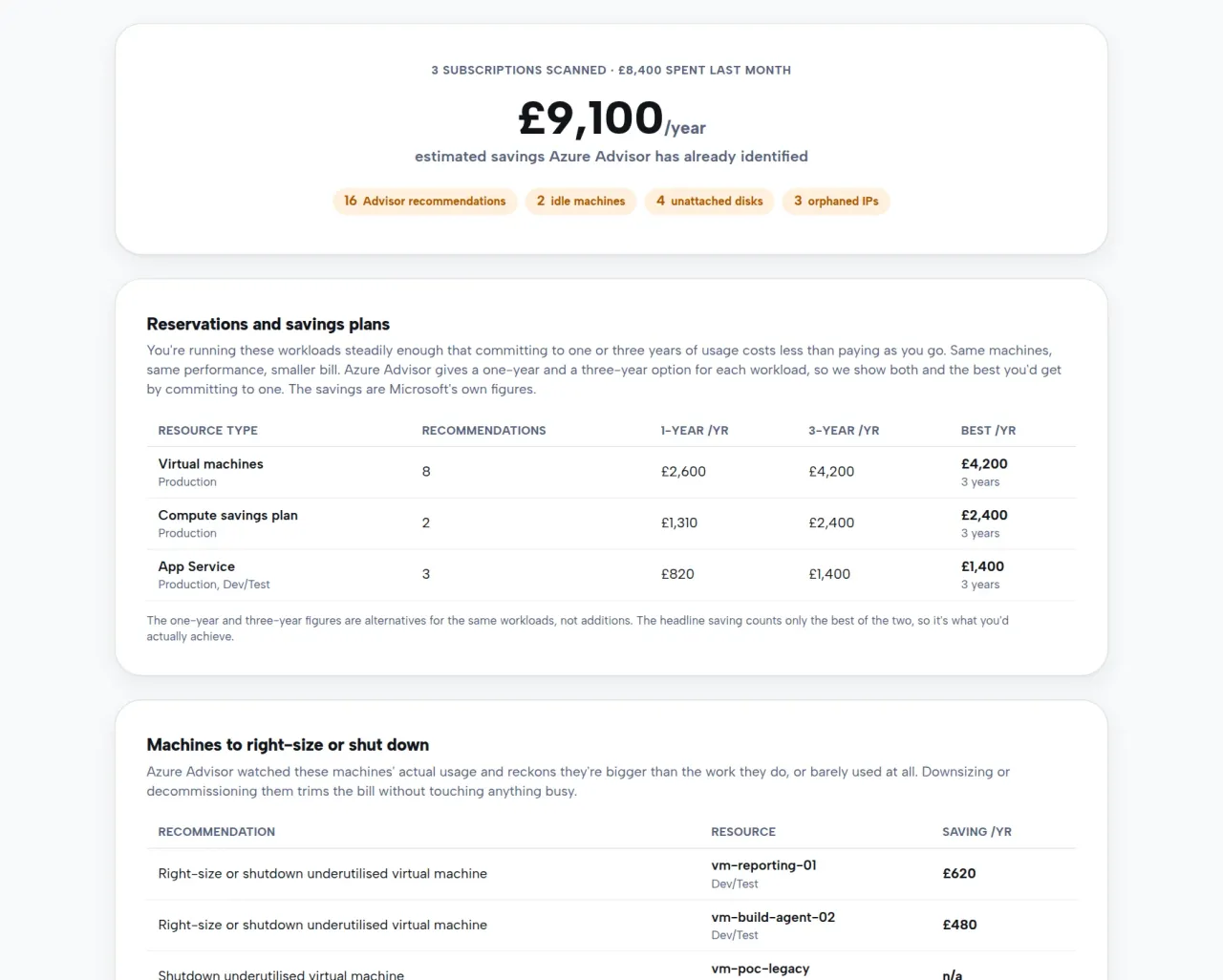
- Reservations and savings plans. For workloads you run steadily, Azure Advisor works out how much a one or three year commitment would save. Same machines, same performance, smaller bill. We group these by resource type so you see the shape of the opportunity, not a wall of near-identical rows.
- Machines to right-size or shut down. Advisor watches actual usage and flags machines that are bigger than the work they do, or barely used at all.
- VMs stopped but still billing. Azure has two kinds of off. A machine stopped from inside the operating system keeps its compute reserved and keeps costing money. Only a deallocated machine stops the meter.
- Unattached disks and orphaned public IPs. Resources paying rent with nothing depending on them, usually survivors of deleted machines and gateways.
- Spend by subscription. Last month’s actual cost per subscription, for context, straight from Azure’s billing data.
An honest number
The headline is Azure Advisor’s own savings estimate, not ours. One thing worth knowing: Advisor offers a one year and a three year option for the same workload, and you only ever commit to one. Plenty of tools add both together and quote an inflated figure. We show both options and count only the best of the two, so the number you see is what you could actually achieve.
Everything runs read-only. We never see your password, the tool cannot change anything in your subscriptions, and nothing is stored on our servers. You can revoke the access straight afterwards in Microsoft Entra under Enterprise applications, and unlike a licence review, this one only needs Reader access on a subscription, so you usually do not need to be a global admin to run it.
Turning findings into a smaller bill
Some of the fixes are quick wins you can do yourself: deallocate the stopped machines, delete the disks and IPs nothing depends on. The reservations and right-sizing are where a steady hand pays off, because the savings are real but so is the risk of committing to the wrong thing. That is what our Azure team does, and our cloud operations centre keeps the estate lean month after month rather than letting the waste creep back.
Try it now
Run the free Azure cost review. It takes about a minute, the summary is yours either way, and the worst case is finding out your bill is already tight. If you would like a second pair of eyes on the numbers, get in touch and we will talk them through with you.