
The password is the weakest part of almost every business. Most breaches still start the same way: someone’s password gets phished, guessed or reused, and an attacker walks in through the front door wearing a real staff badge.
A few years ago the answer was “turn on MFA”, and that was good advice. It still is. But the ground has shifted. Attackers now run slick, automated phishing kits that sit in the middle and relay your one-time codes in real time. The multi-factor setup that felt bulletproof in 2023 can be walked straight through today.
The proper fix is to stop relying on secrets people can be tricked into handing over, and move to phishing-resistant, passwordless sign-in. It sounds like a big leap. In practice it is very achievable, and it is exactly the kind of work we have been rolling out for clients recently.
Your MFA was a great step. It might not be enough now.
Not all MFA is created equal. The common types, a text message code, a one-time code from an app, or an approve/deny push, all share one weakness: the person can be socially engineered into completing them on a fake page, or worn down by a flood of prompts until they tap “approve”.
Two attacks make this real:
- Adversary-in-the-middle phishing. The victim lands on a convincing fake login page. They type their password and their code, the attacker’s server relays both to the real service instantly, and the attacker captures the resulting session. The code did its job and it still failed.
- MFA fatigue. The attacker already has the password and simply spams approval prompts until a tired user taps yes.
The lesson is not “MFA is pointless”. It is that the type of MFA matters enormously.
Not all logins are equal
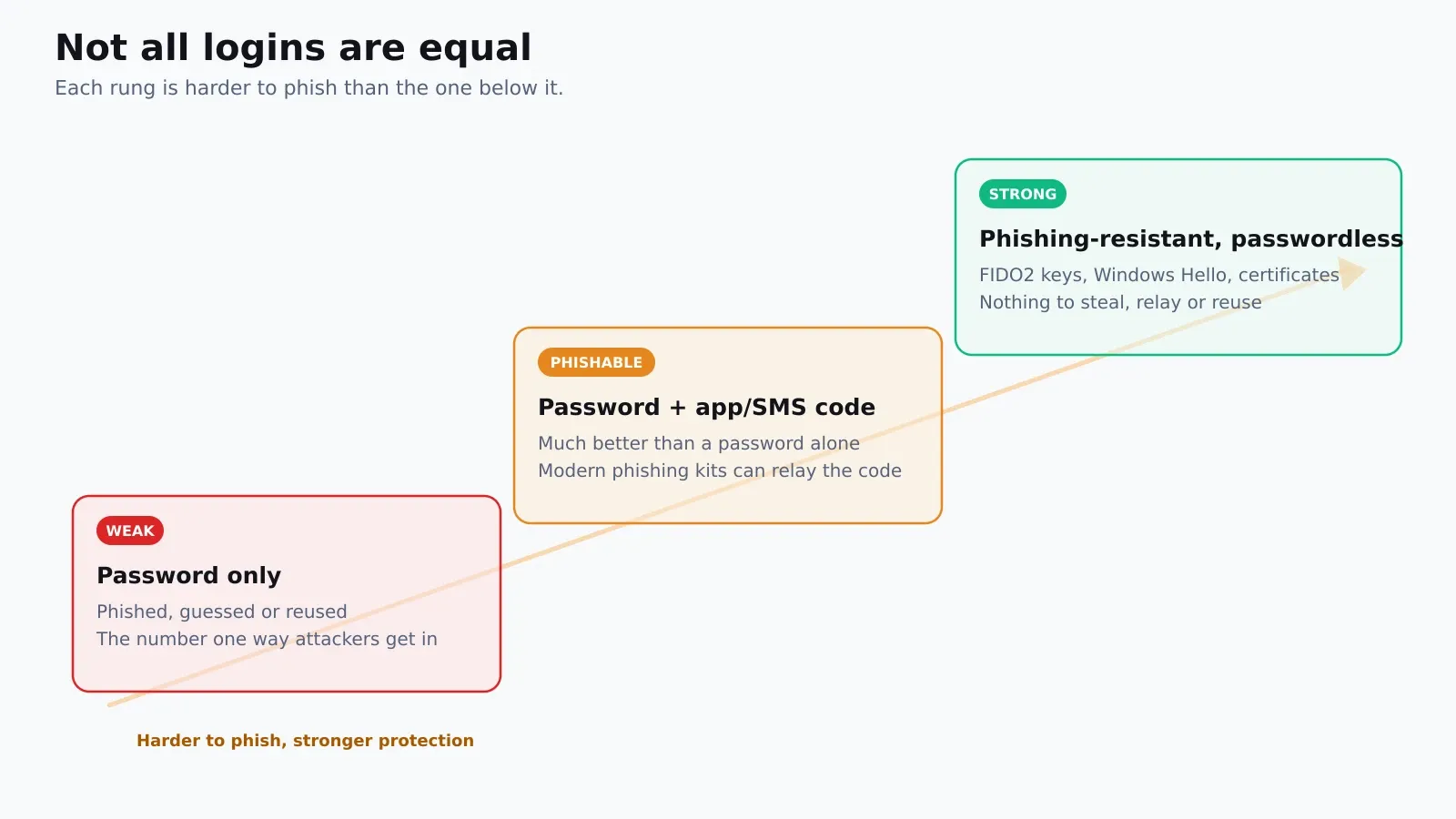
The goal is to climb the ladder: off passwords entirely, and onto methods an attacker cannot phish, relay or reuse.
What “phishing-resistant” actually means
The magic is simple once you see it. A phishing-resistant credential is bound to the real website and to a piece of hardware. It only works on the genuine domain, and the secret never leaves the device, so there is nothing for a fake page to capture or replay.
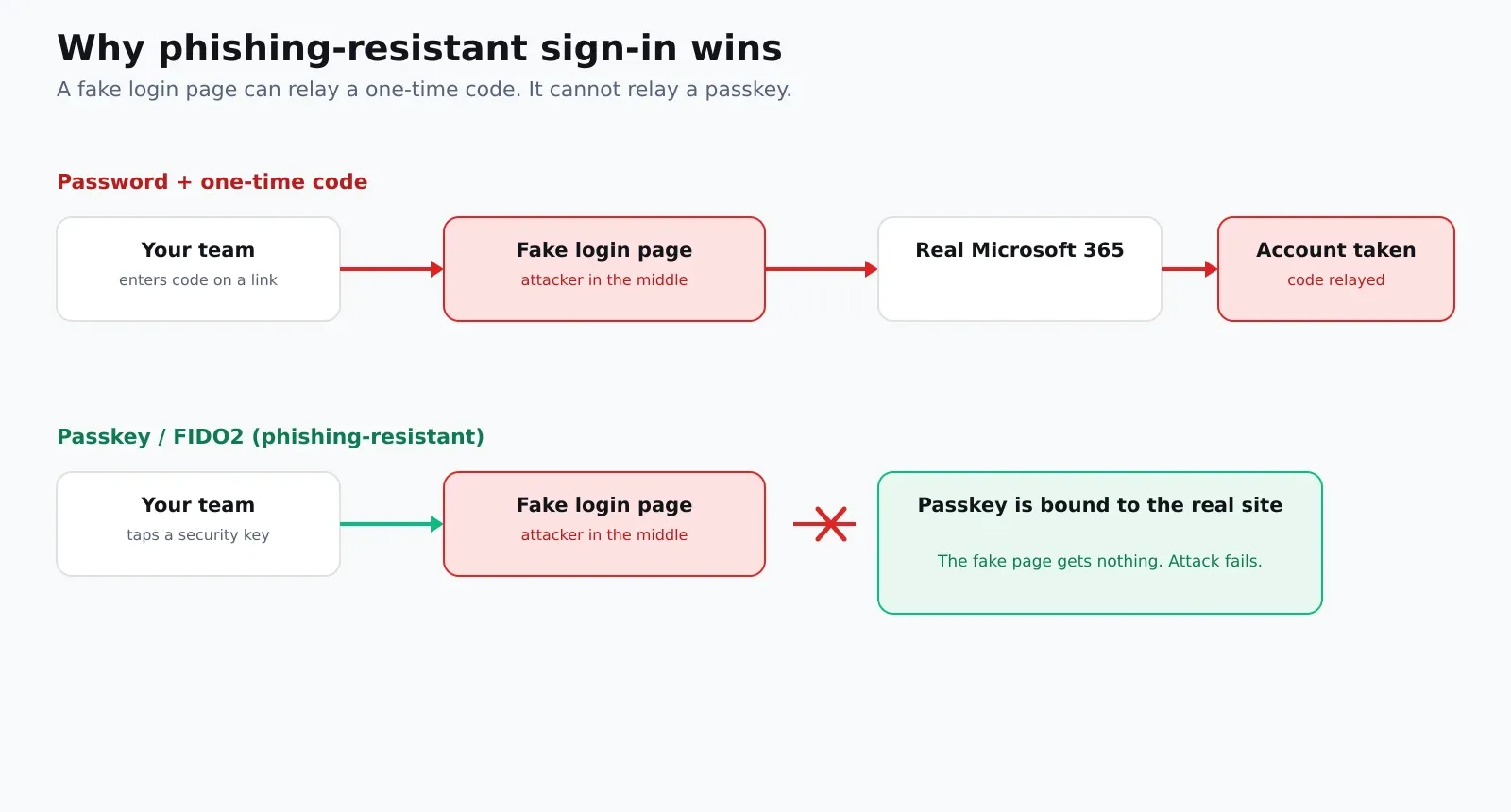
A fake page can relay a code. It cannot relay a passkey. That single property is what takes the most common attack off the table.
The toolkit we use
Phishing-resistant sign-in is not one product, it is a small set of Microsoft and hardware capabilities used together. What we typically deploy:
- Microsoft Entra ID Conditional Access as the control plane, requiring strong, phishing-resistant methods for the accounts and situations that matter most, starting with administrators.
- FIDO2 security keys such as YubiKeys for admins, shared devices and frontline staff who do not have a personal phone in play.
- Windows Hello for Business for everyday sign-in, where a face, fingerprint or PIN unlocks a credential tied to the device’s secure chip. Fast for users, useless to a remote attacker.
- Passkeys in the Microsoft Authenticator app for a smooth passwordless experience on managed mobiles.
- Certificate-based authentication and EAP-TLS so the same principle extends to your network: Wi-Fi and VPN access proven by a device certificate rather than a shared password that walks out of the building on a sticky note.
Tie those together and you can genuinely retire the password for day-to-day work, and lock the door on the attacks that rely on it.
How we roll it out without the chaos
The technology is the easy part. Doing it without locking people out or generating a mountain of support tickets is where the experience shows. Our approach is deliberately phased:
- Assess and design. Confirm licensing, map who needs which method, and identify legacy authentication that quietly bypasses modern controls.
- Protect the crown jewels first. Get administrators onto security keys before anything else, because those are the accounts attackers want most.
- Pilot with a friendly group. Prove the experience with a small ring, iron out enrolment and edge cases, then expand.
- Roll out in rings. Enrol users in waves with clear guidance, using Conditional Access to require the stronger methods as adoption grows.
- Set up break-glass accounts. Always keep a tested, tightly controlled emergency route in so a policy change can never lock everyone out.
- Turn off the weak options. The final, important step: disable legacy authentication and retire the phishable methods, so there is no soft path left for an attacker to fall back to.
Done this way, most users end up finding it easier than before. No more forgotten passwords, no more codes to type, just a tap or a glance.
Where to start
If you want a quick, no-cost win this week: turn off legacy authentication, and get your admin accounts onto security keys or passkeys. That alone removes the routes behind a large share of account takeovers.
From there, a proper plan for Windows Hello and, where it fits, certificate-based network access will let you retire passwords for good. This is core modern workplace and endpoint management work, and it usually fits inside the Microsoft licensing you already own.
If you would like to know where your current sign-in security stands, and the fastest route to phishing-resistant, an AI security audit or a short review with our team is a sensible first step. Get in touch and we will give you a straight, no-pressure view.