Some workloads just don’t want to leave the building. A production line that cannot tolerate a wobbly internet link. Patient data that has to stay on site. A warehouse system where every millisecond of latency shows up at the picking face. For years the choice was binary: keep those systems on ageing on-premises kit and lose the benefits of cloud, or force them into Azure and hope.
Azure Local is Microsoft’s answer to that dilemma, and it’s one of the more sensible things they’ve shipped in years. Here’s what it is, how it works, what it costs, and how to work out whether it belongs in your estate.
What is Azure Local?
Azure Local is Azure infrastructure that runs on servers in your own building. If the name doesn’t ring a bell but “Azure Stack HCI” does, it’s the same technology: Microsoft renamed it in late 2024 and has kept building on it since.
The idea is simple to state. You buy validated server hardware from a mainstream vendor, and Microsoft’s software turns it into a small, self-contained cloud: compute and storage pooled across the machines, virtual machines and containers running on top, all of it registered in Azure and managed through the same portal as your other cloud resources.
Crucially, this is not a science project for enterprises with a datacentre estate. An Azure Local system can be as small as a single node, scaling to sixteen per system, which puts it comfortably within reach of a mid-sized UK business with one good comms room.
How it works
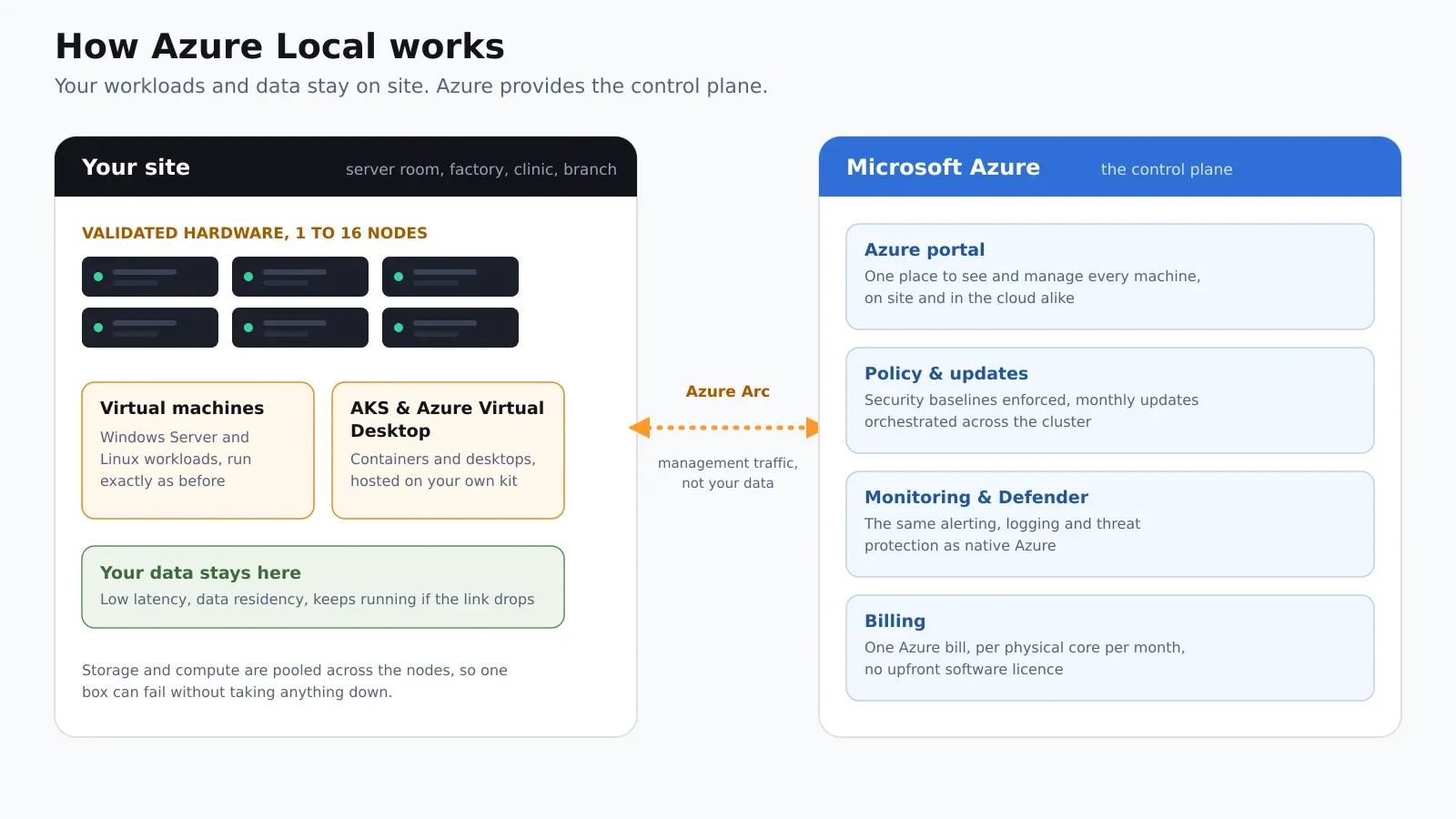
The trick that makes Azure Local different from a traditional virtualisation cluster is the split between where things run and where they’re managed:
- Your workloads and data stay on site. Windows Server and Linux virtual machines, Kubernetes (AKS) and even Azure Virtual Desktop session hosts run on your own hardware. If the internet link drops, they keep running.
- The management lives in Azure. Through Azure Arc, every machine appears in the Azure portal alongside your native cloud resources. Security baselines, update orchestration, monitoring, Microsoft Defender and backup all work the same way in both places, and your team learns one set of tools rather than two.
- Resilience is built in. Storage and compute are pooled across the nodes, so a failed server means a failover, not a phone call at 3am. With two or more nodes you get the kind of availability that used to need a SAN and a specialist.
The practical effect: you stop running a snowflake on-premises environment with its own tooling, patching regime and quirks, and start running a small piece of Azure that happens to sit in your rack.
What it costs
This is where Azure Local gets interesting, because the licensing is unusually friendly to organisations that already own Microsoft infrastructure licences.
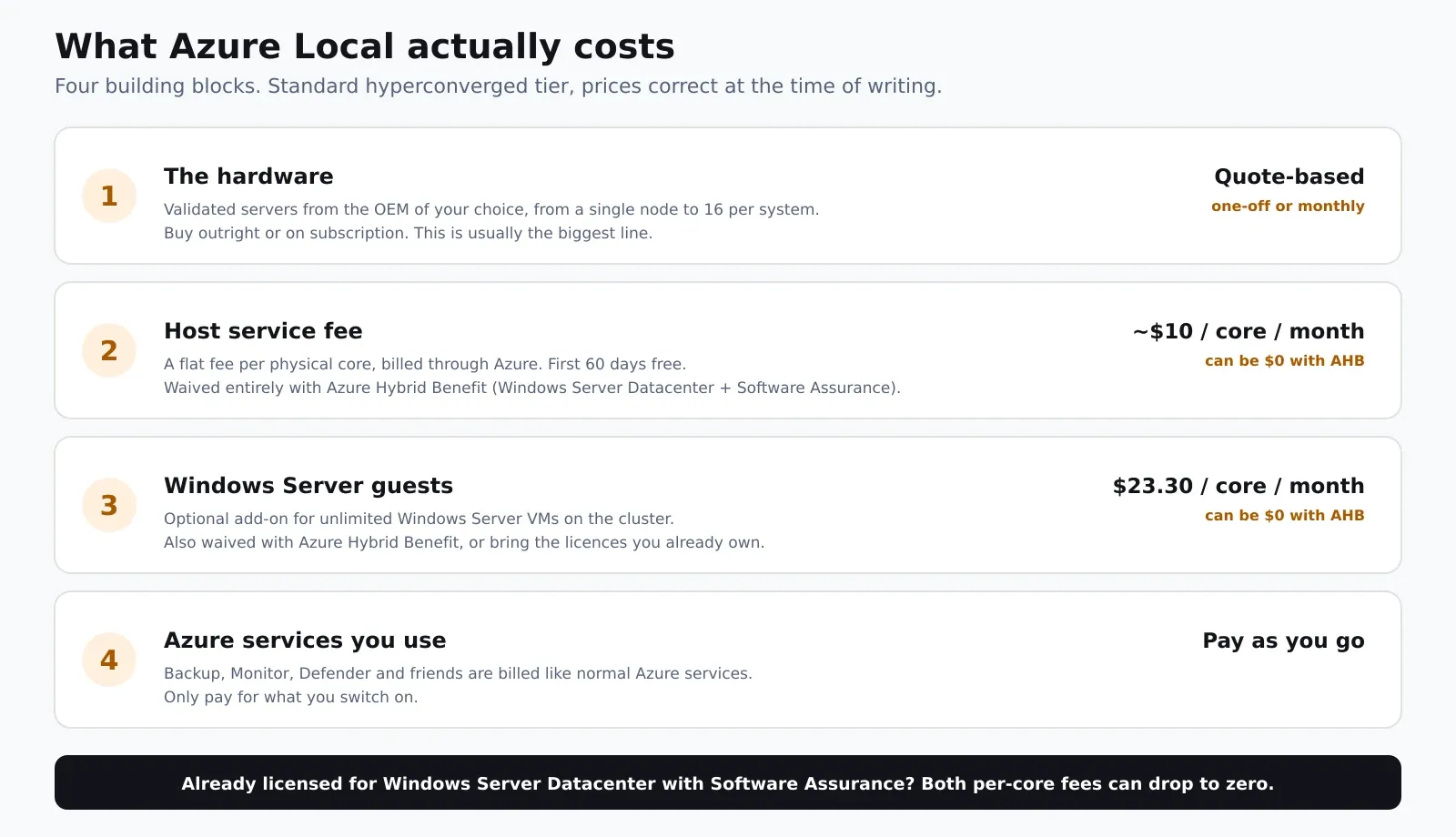
Four building blocks, with figures correct at the time of writing for the standard hyperconverged tier:
- The hardware. Validated servers from the OEM of your choice, bought outright or on subscription. This is usually the biggest line, and sizing it correctly is where most of the design effort goes.
- The host service fee. A flat fee of roughly $10 per physical core per month, billed through your Azure subscription like any other service. The first 60 days are free. There is no big upfront software licence.
- Windows Server for the VMs. An optional add-on of $23.30 per physical core per month covers unlimited Windows Server guest VMs on the system, or you can bring the licences you already own.
- Azure services you consume. Backup, Monitor, Defender and friends are billed exactly as they are in the cloud. You only pay for what you switch on.
The kicker is Azure Hybrid Benefit: if you’re licensed for Windows Server Datacenter with active Software Assurance, both per-core fees above can drop to zero. For a business already holding those licences, the software cost of running Azure Local can be almost nothing beyond the hardware, which changes the maths dramatically.
And on the maths: don’t compare sticker prices in isolation. We’ve written before about the true cost of cloud versus on-premises, and Azure Local sits right in the middle of that comparison: cloud-style billing and management, with on-premises hardware economics. Run the numbers for your own estate before deciding anything.
Where it fits, and where it doesn’t
Azure Local earns its place when there’s a solid reason for workloads to stay physical and local:
- Manufacturing, where shop-floor systems, MES and historians can’t hang off an internet connection.
- Healthcare and regulated sectors, where data residency and sovereignty are non-negotiable.
- Latency-sensitive applications such as warehouse control, CCTV analytics or anything with a real-time feel.
- Sites with unreliable connectivity, where local survivability matters.
- Steady, predictable workloads where owned hardware beats renting compute, which is exactly the scenario our TCO comparison keeps flagging.
It’s the wrong tool if your workloads are spiky, internet-facing or already running happily in native Azure. And it isn’t a way to avoid modernising: it works best as one leg of a deliberate hybrid cloud design, with native Azure doing what it does best alongside.
How Next2IT can help
We design and run this kind of estate every day, and because we’re vendor-independent, we’ll tell you plainly if Azure Local isn’t the right answer for you. Where it is, we can take you end to end:
- Assess. Workload-by-workload analysis of what should live in native Azure, what belongs on Azure Local, and what should be retired, with a costed business case built on your real numbers.
- Design and size. Node count, cores, storage and resilience matched to your workloads, with hardware quotes from the OEMs that fit, not the one with the best margin.
- License it properly. Azure Hybrid Benefit, Software Assurance and Microsoft licensing positioned so you pay Microsoft as little as legitimately possible.
- Deploy and migrate. Networking, firewalls, Arc registration, cluster build and workload migration, delivered alongside the systems you’re running today, with cutover planned around your business.
- Run it 24×7. Once live, the platform is patched, monitored and supported around the clock by our network operations centre, as part of a managed private cloud or hybrid service.
The bottom line
Azure Local removes the old trade-off between cloud manageability and on-premises control. Your workloads stay in the building, your management moves to one modern control plane, and if you already hold the right Windows Server licences, the software cost may be far lower than you’d expect.
If you’re staring at an ageing VMware or Hyper-V cluster and wondering what comes next, this deserves a place on your shortlist. Get in touch and we’ll help you work out whether it stacks up for your estate.